Promote a rental on social media: a landlord's quick-start plan
18 August 2026
12 min read
Unlock quick strategies to effectively promote your rental on social media. Use engaging visuals and timely responses to attract renters fast!
The most effective way to promote a rental on social media is a visual-first listing paired with short-form video and a fast reply window. Post a Reel or TikTok-style walkthrough alongside sharp photos, publish across two platforms at once, and answer every enquiry within an hour. That combination consistently fills units faster and more cost-effectively than many traditional channels, because renters now scroll for homes the same way they scroll for everything else.
Here's your three-step starting checklist:
Shoot five to eight photos and one 20 to 30 second video walkthrough of the property.
Post the same content, adapted, on Instagram and Facebook (or a local Marketplace group) the same day.
Reply to every comment or message within an hour, even if it's just to confirm the viewing time.
Key Takeaways
Promoting a rental on social media works best when visual-first content, fast replies, and Ireland's BER and consumer-ad rules are treated as one connected process, not separate tasks.
Point
Details
Lead with video
Short-form walkthroughs on Instagram or TikTok convert better than static photos alone.
Pick two platforms
Combine one visual-first channel with one local-listing channel like Facebook Marketplace.
Reply within an hour
Fast, templated first replies convert far more enquiries into booked viewings.
Display BER correctly
Every social advert for a let must show the current BER rating to stay compliant.
Verify leads with Hauzed
Hauzed filters social enquiries into verified profiles to cut down on message overload.
#social media rental marketing#social media for property rentals#how to market rentals online#advertise rental on social media#effective rental promotion strategies#promoting rental listings#promote rental on social#best social platforms for rentals
How to choose the right social platforms for your rental
You don't need to be everywhere. You need to be in the right place with the right format, and that varies more than most landlords expect.
Facebook (particularly Marketplace and local community groups) still produces the fastest enquiries for standard rentals, especially in mid-market price bands where renters search by area rather than lifestyle. Instagram works best for building a visual brand around a property or a portfolio, showing off finishes and neighbourhood character to renters who are still deciding where to live. TikTok rewards discovery and storytelling, a walkthrough with personality can outperform a polished but flat photo set, particularly with renters under 35. LinkedIn has a narrower but useful role for professional-grade or corporate lets aimed at relocating employees.
Facebook Marketplace and groups: fastest for local, price-sensitive leads.
Instagram: best for aesthetic, brand-led listings and Stories/Reels.
TikTok: strongest for discovery among younger renters and shareable walkthroughs.
LinkedIn: useful for corporate or relocation-focused lets only.
A workable rule for a single landlord with limited time: pick one visual-first platform (Instagram or TikTok) and one local-listing channel (Facebook), then repurpose the same photos and video across both rather than creating separate content for each.
Write a listing title and description that actually gets clicked
A strong title follows a simple formula: bedrooms + standout feature + area or proximity. "2-Bed Apartment, Balcony, 5 Minutes to Luas" beats "Lovely Apartment To Let" every time, because it answers the three questions a renter asks before they even click.
Your description needs to do the selling in the first two lines, since most social feeds truncate longer text. Structure it like this:
Lead with the headline benefit (space, location, standout feature).
State the essentials clearly: rent, deposit, availability date, BER rating where required.
List two or three amenities as tenant benefits, not just features ("Dishwasher, so no more washing up after work" beats "Dishwasher included").
Close with a direct call to action: "Message us to arrange a viewing this week."
On pricing, a few quick checks reveal whether you're off-market before you've wasted two weeks:
Compare five similar listings in your area posted in the last fortnight.
If a post gets views but zero enquiries within 48 hours, the price is usually the problem, not the photos.
Try a simple test: offer the same unit at a slightly reduced rent for one week versus adding a tangible benefit (first month's utilities covered) at the original rent, and see which pulls more replies.
Photo, video and virtual-tour checklist that converts scrollers into viewers
Photos get someone to stop scrolling. Video gets them to imagine living there. You need both, and neither has to involve hiring anyone.
Your shot list, in order:
Exterior and entrance: the building front, doorway, and any parking or garden.
Living room: shot from the corner that shows the most floor space, natural light on if possible.
Kitchen: worktop clear, appliances visible, one angle showing storage.
Bedroom(s): bed made, wardrobe doors closed, window light included.
Bathroom: clean, well-lit, no personal items visible.
Storage and utility spaces: presses, attic access, washing machine location.
Neighbourhood: one shot of a nearby amenity, park, shop, or transport stop.
For short-form video, three formats work reliably: a 20 to 30 second continuous walkthrough narrated over the footage; a "what €X gets you in [area]" style comparison video; and, where a current tenant is willing, a short resident-style clip about what they like living there. Video tours and resident-generated content provide social proof that static photos can't match on their own.
For virtual tours, a free 360-degree smartphone app covers most standard lets. Reserve a professional photographer or virtual-tour provider for higher-value properties or portfolios where the extra polish pays for itself across multiple listings.
Pro Tip:Film your walkthrough video in portrait orientation, not landscape. Every major platform now defaults to vertical viewing, and a landscape video gets cropped or shrunk in the feed.
Posting schedule, captions and hashtags that drive enquiries
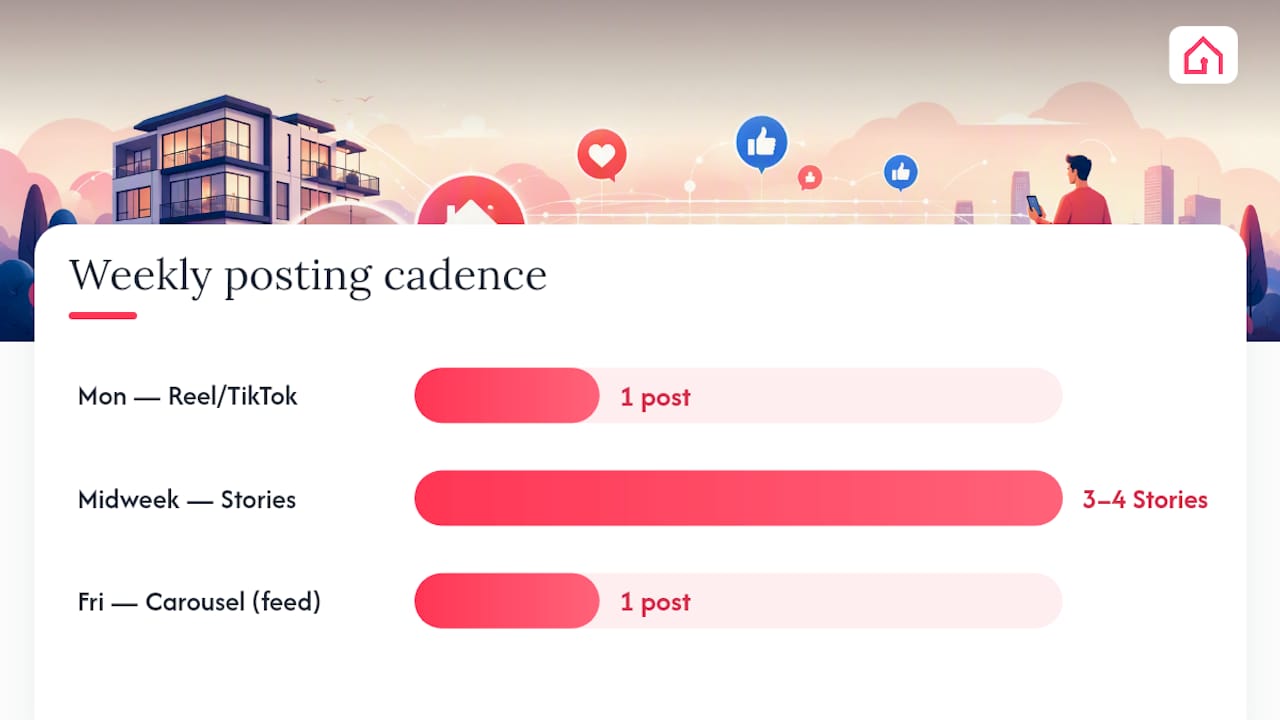
Consistency beats intensity here. A realistic weekly cadence for one active listing: one feed post, three to four Stories, and one Reel or TikTok, spread across the week rather than bunched on one day.
Three caption formulas worth stealing:
Drive enquiries: "2-bed, bright, walk to everything. Available from March 1st. Comment 'INFO' and we'll send full details."
Push viewings: "Viewings running this Saturday, 10am to 1pm. Message us your preferred slot, spaces are limited."
Promote a move-in incentive: "First month's rent includes utilities. One unit left for this offer, message to check availability."
Hashtags work differently depending on who you're trying to reach. For students, pair a local tag with campus-adjacent terms (#DublinStudentHousing, #CityCentreRental). For working professionals, lean on commute and lifestyle tags (#DublinCommute, #ApartmentLiving). For families, prioritise school catchment and space-related tags (#FamilyHome, #GardenApartment). Geotagging the specific area or neighbourhood consistently outperforms broad city-wide tags for enquiry volume.
Repurpose one shoot across the full week: the same video becomes a Reel on Monday, three Stories through midweek, and a static carousel from stills on Friday. Even small-scale landlords can compete with larger firms using this kind of scheduling discipline rather than constant new content.
When paid social is worth the spend
Organic posting covers most standard lets. Paid social earns its place when time is tight or the unit is unusual enough that it needs a wider net than your existing followers provide.
Boost a post when you need extra local reach fast, typically when a unit has been listed more than a week with low views.
Run a small targeted ad when the property type is niche (large family home, high-end finish, pet-friendly) and needs to reach beyond your immediate followers.
Set a short test budget, something in the region of €10 to €20 a day for seven to fourteen days, aimed purely at local reach or traffic, then judge results before spending more.
Your targeting checklist: a tight geographic radius around the property, an age range matched to the unit type (students versus professionals versus families), relevant life-event targeting (recently moved, new job), and a retargeting layer for anyone who's already visited your listing page or profile.
Pro Tip:Retargeting past visitors is usually the cheapest, highest-converting layer in a small budget. They've already shown interest, you're just reminding them.
Turning enquiries into viewings without the message chaos
Speed and structure matter more than charm here. A first reply within the hour, using a consistent template, converts far better than a fast but scattered one.
First reply template: "Thanks for your interest! To check fit quickly, could you share your preferred move-in date, monthly budget, and how many people would be living there?"
Screening questions worth asking early, before you invest time in a viewing:
Current employment status and approximate income.
Whether they can provide references from a previous landlord.
Number of occupants and whether pets are involved.
Whether a guarantor is available, if required.
For scheduling, offer two or three fixed time blocks rather than open-ended availability, confirm the slot in writing the day before, and use the viewing itself to ask about their timeline and any deal-breakers. This keeps the process moving without you managing a dozen separate back-and-forth threads.
Staying compliant when advertising rentals in Ireland
Two compliance points catch landlords out more than any other. First, any advert for a property to let must display the current Building Energy Rating from the certificate, including on social media posts, using the correct alphanumeric rating and presentation. Omitting it isn't a grey area; the Law Society of Ireland notes that failing to include BER information can amount to an offence under the regulations.
Second, advertising standards on social platforms require the same truthfulness as any other medium, and any paid or incentivised endorsement, such as asking a tenant to post about your property in exchange for a discount, must be clearly labelled as such.
Adverts placed on social media are explicitly in scope for BER disclosure and consumer-protection rules. There's no informal exemption just because the post appeared on Instagram rather than a listings site.
On privacy, keep tenant data requests minimal on public platforms: collect only what you need to assess fit (move-in date, budget, occupants), and move anything sensitive, references, income documents, ID, to a private, secure channel rather than public comments or open chat threads.
Measuring whether your social posts are actually working
Track five numbers, no more: impressions or reach, engagement rate, enquiries per post, conversion rate from enquiry to viewing, and days vacant after the first post goes live.
The diagnostics are simple once you have a week or two of data:
High views, low enquiries: your creative isn't matching what renters actually want to know, tighten the caption and price visibility.
Good enquiries, few viewings booked: your reply speed or screening process is losing people, check your first-reply time.
Steady enquiries, no lets: the price is probably off, not the marketing.
A basic spreadsheet tracking cost-per-enquiry and conversion rate across your last three listings tells you more than any single platform's built-in analytics dashboard.
When social posting isn't enough on its own
Social media gets eyes on your property. It doesn't filter who's actually a serious, qualified applicant, and that's usually where the real time cost shows up, dozens of messages, half of them vague, some never following through.
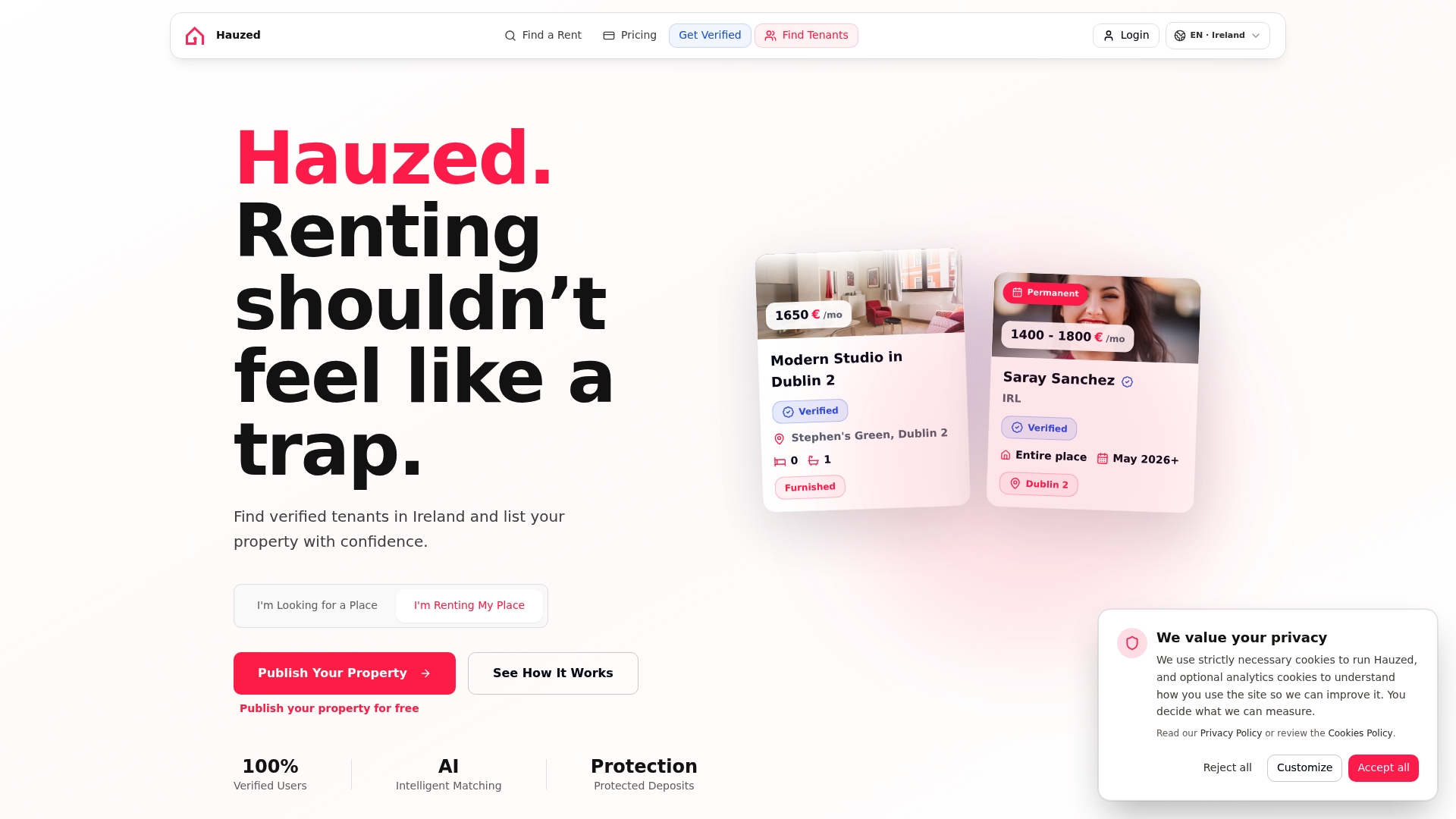
This is the gap Hauzed is built to close. Verified tenant profiles mean you're reviewing people who've already confirmed their identity, not anonymous accounts. AI-assisted tenant matching surfaces applicants who actually fit your property's requirements, and secure chat plus workflow automation keeps scheduling and follow-up from eating your evenings.
Practical use cases: route social enquiries into a single verified pipeline instead of three separate inboxes, use scheduling tools to confirm viewings without endless back-and-forth, and if you manage several units, bulk-publish listings rather than rebuilding each one from scratch.
Worth being clear about the limits: verification improves lead quality, it doesn't guarantee a tenant will be approved or that a tenancy will go smoothly. That decision, and the responsibility, still sits with you.
Pro Tip:Use social media for reach and Hauzed for filtering. Trying to do both jobs inside a Facebook inbox is where most landlords lose their evenings.
A landlord's honest note on what actually moves the needle
In practice, the biggest difference isn't the platform, it's whether you treat the video and photos as seriously as you'd treat a listing on a professional site. Renters scroll past flat, poorly lit posts without a second thought. Pair that visual effort with a verification layer, and you stop wasting time on leads that were never going anywhere.
Get verified leads instead of message overload
Hauzed is the alternative to sorting through dozens of unverified social media messages one by one. Instead of guessing who's a genuine applicant, you get tenant profiles that have already been through identity verification, plus AI matching that flags the people who actually fit your property before you spend an evening replying to everyone.
Landlords running one property or managing a full portfolio can start on the Free plan and see how verified enquiries compare to what you're used to from social alone. If you're managing multiple units, the tenant-matching tools are worth checking directly against your current workflow. Sign up, publish your first listing, and see how many verified conversations you get in a week compared with your last social-only post.
What should landlords post on social media for a rental?
Post a short-form video walkthrough, five to eight sharp photos covering every room, and a clear caption stating rent, availability, and how to enquire, then repeat that format weekly with fresh angles.
How quickly should I reply to a rental enquiry on social media?
Aim to reply within an hour using a template that confirms move-in date, budget, and occupant count, since response speed is one of the strongest predictors of converting an enquiry into a viewing.
Do I have to show the BER rating in a social media rental advert?
Yes, adverts for lets that fall within scope must display the current BER energy performance indicator, and platforms like Instagram and Facebook are explicitly included, not exempt.
Can Hauzed help after I've posted on social media?
Hauzed doesn't replace your social posts, it filters the enquiries they generate into verified tenant profiles with AI matching, cutting down the time spent screening unverified messages.